Professional headshots without a photo shoot

AI headshot generator: professional headshots from your selfies

Upload a few selfies, pick a style and get polished headshots for LinkedIn, your résumé or your company's team page. No prompt writing and no studio booking.

  • Pick a style, no prompt writing
  • 2 free Fast headshots at sign-up
  • Photos private to your account
1 to 3 photos of you, or of an adult who agreed. No children. PNG, JPEG or WebP, 10 MB each.
Styles
Model
Crop
Resolution
Variations

20 credits

Add a selfie to create your headshot

At a glance

Headshot Generator AI is an AI headshot generator that turns 1 to 3 everyday selfies into professional headshots: head-and-shoulders framing, a clean background, the outfit you choose and soft, flattering light. Pick a style such as corporate, LinkedIn, actor or doctor, then generate with Fast (20 credits per headshot) or Studio (45 credits, best likeness and skin detail). New accounts get 2 free Fast headshots at sign-up, and failed generations are refunded automatically.

What you upload
1 to 3 selfies of yourself (PNG, JPEG or WebP, 10 MB each)
Price per headshot
20 credits with Fast, 45 with Studio
Cost in dollars
About $0.17–$0.25 (Fast) or $0.39–$0.56 (Studio)
Free to try
40 credits at sign-up: 2 Fast headshots, then paid
Crops and sizes
1:1, 4:5, 3:4, 2:3 at 1K or 2K, up to 1696 × 2528 px
Per run
1 or 2 variations to compare

Why people choose this AI headshot generator

A good headshot looks like you on your best day: sharp eyes, flattering light, a background that does not compete. The generator is built around exactly that.

  • 01

    Pick a style, not a prompt

    Choose corporate, LinkedIn, actor, doctor, real estate and more from the style menu. Add details such as an outfit or a background color only if you want to.

  • 02

    Your face, kept

    Every request tells the model to keep your face shape, features, skin tone, age, hairline and eye color, and not to slim or smooth your face.

  • 03

    Real headshot framing

    Head-and-shoulders crops in 1:1 for profiles, 4:5 and 3:4 for team pages and 2:3 for print and casting, at 1K or 2K.

  • 04

    Two variations per run

    Ask for up to 2 variations at once and keep the one that looks most like you. Each variation is priced like a single headshot.

  • 05

    Private by default

    Your selfies and headshots appear only in your account. They are never published, used as site examples or used by us to train models.

  • 06

    Prices you see first

    The credit price shows before you press the button, and generations that fail are refunded to your balance automatically.

How to make an AI headshot in three steps

It takes about as long as choosing a profile photo.

  1. 01

    Upload 1 to 3 selfies

    Use sharp, well-lit photos of your face looking at the camera. Two or three angles help the model keep your likeness.

  2. 02

    Choose a style

    Tap a style such as Corporate or LinkedIn, or describe the outfit, background and mood in your own words.

  3. 03

    Generate, compare, download

    Results usually arrive within a minute. Keep the most natural variation and download it for your profile, website or print.

What an AI headshot generator does

An AI headshot generator creates a new, professional-looking portrait from the photos you already have. Instead of booking a photographer, you upload a few selfies and an image model redraws you with studio-style light, a clean background and the clothes you choose.

Headshot Generator AI wraps every request in a headshot brief: keep the person's identity exactly, frame head and shoulders, keep the eyes in sharp focus and the skin texture natural, and add no text or watermark. You only describe the style, so the results look like headshots rather than art experiments.

The result is a generated image, not a photograph. Check that it looks like you before you use it, and keep using real photos wherever a document requires one, such as passports, visas and ID cards.
Fast or Studio: which model to use

Fast runs Nano Banana 2 at 20 credits per headshot. It is quick and good for trying styles, backgrounds and outfits before you settle on a look.

Studio runs Nano Banana Pro at 45 credits. It studies the reference photos more carefully, which gives the strongest likeness, more natural skin and finer hair detail. Use it for the headshot you will actually publish.

  • Exploring styles and outfits: Fast
  • Final LinkedIn or company photo: Studio
  • Print, speaker pages and large website photos: Studio at 2K
  • A team look: test with Fast, then make everyone's final with Studio

Selfies that make better headshots

The model can change light, clothes and background, but it can only keep what it can see. These habits matter more than anything you type:

  • Face a window: soft daylight from the front, no harsh overhead light
  • Hold the camera at eye level and at least an arm's length away
  • Keep your face clear: no sunglasses, hats or hair across the eyes
  • Skip beauty filters so your skin and features stay true
  • Upload two or three photos with slightly different angles
  • Use recent photos that show you as you look today

Your photos stay yours

Upload only photos of yourself, or of an adult who has agreed to it. Photos of children are not allowed. Your selfies are stored at an unlisted link so the model can read them, your headshots are saved to your private history, and neither is ever shown to other visitors.

We keep them while your account is open, with no automatic deletion schedule, and delete them when you ask us to or close your account. We do not sell your photos or use them to train models.

Before and after, with fictional AI-generated people

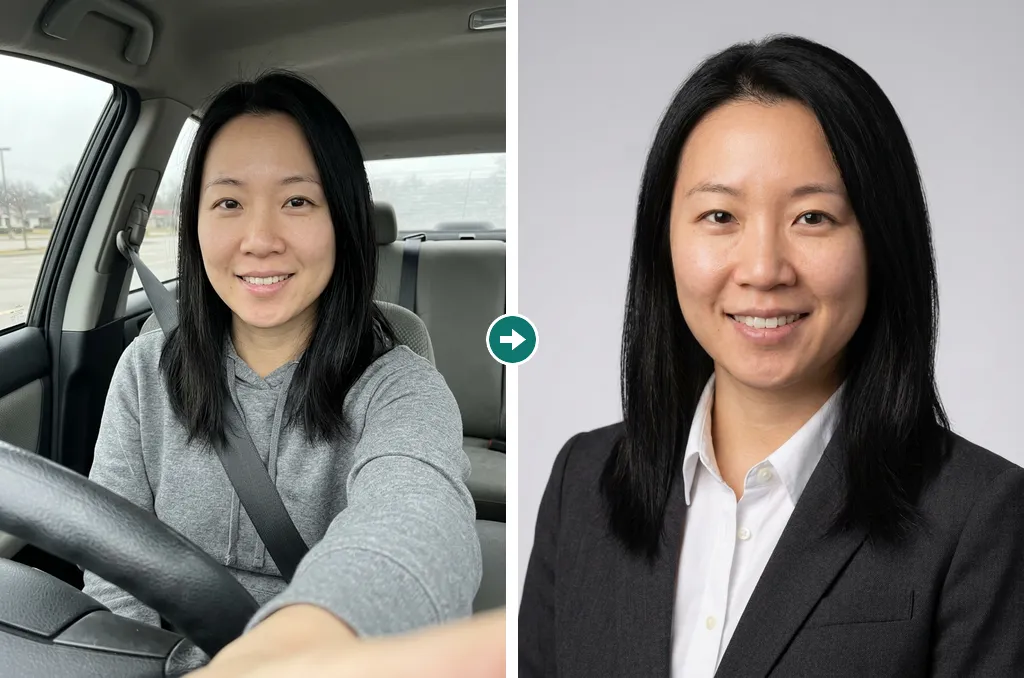
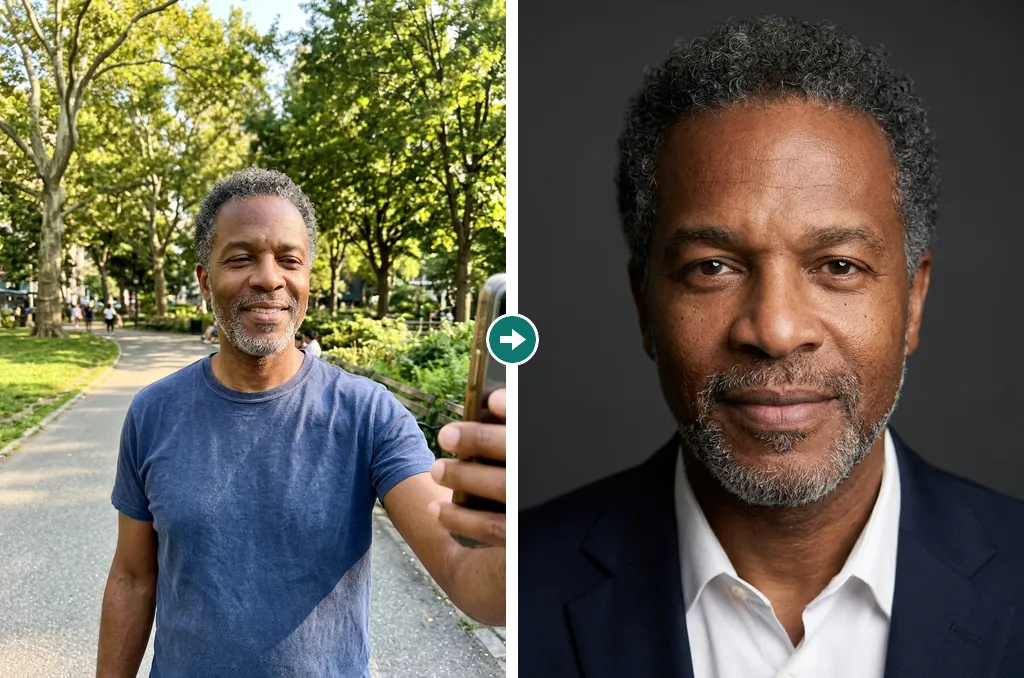
These people do not exist. Their “before” selfies and their headshots were all generated by AI for this page, with the same style menu and headshot brief you use: one casual selfie each, the Studio model, a 3:4 crop, one run per style and no retouching.

  • AI-generated example of a fictional person, a woman in her thirties: left, a casual selfie in a parked car, in a gray hoodie; right, a corporate headshot in a dark suit and white shirt on a light gray backdrop, made from that selfie.

    Car selfie → corporate headshot

    Headshot style: Corporate: charcoal suit and white shirt, seamless light gray studio backdrop, soft even light, confident closed-mouth smile

  • AI-generated example of a fictional person, a man in his fifties: left, a selfie in a sunny park, in a navy T-shirt; right, an executive headshot in a navy suit on a dark gray backdrop, made from that selfie.

    Park selfie → executive headshot

    Headshot style: Executive: dark navy suit, dark gray backdrop, refined Rembrandt lighting, calm and assured expression

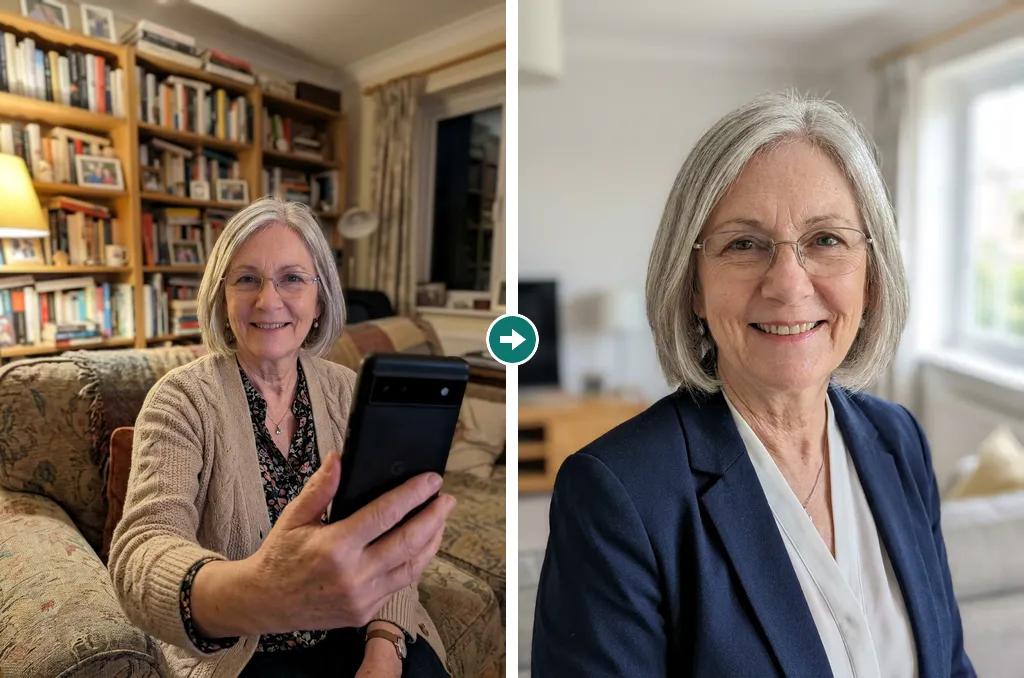
  • AI-generated example of a fictional person, a woman in her sixties with silver hair and glasses: left, a phone photo on her living-room sofa, in a beige cardigan; right, a real estate headshot in a navy blazer with a bright living room blurred behind, made from that selfie.

    Living-room photo → real estate headshot

    Headshot style: Real estate: smart blazer, bright modern living room softly blurred behind, big welcoming smile

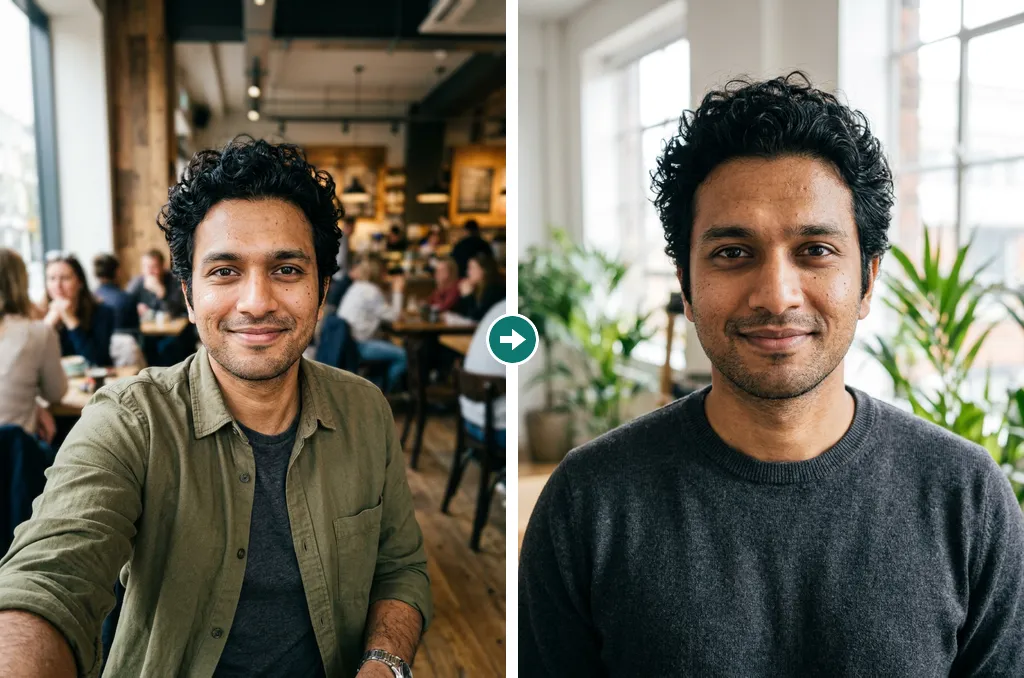
  • AI-generated example of a fictional person, a man in his late twenties: left, a selfie in a busy café, in an olive overshirt; right, a tech startup headshot in a gray sweater in a bright office with plants, made from that selfie.

    Café selfie → tech startup headshot

    Headshot style: Tech startup: plain crew-neck sweater, bright loft office with plants softly blurred, relaxed smile

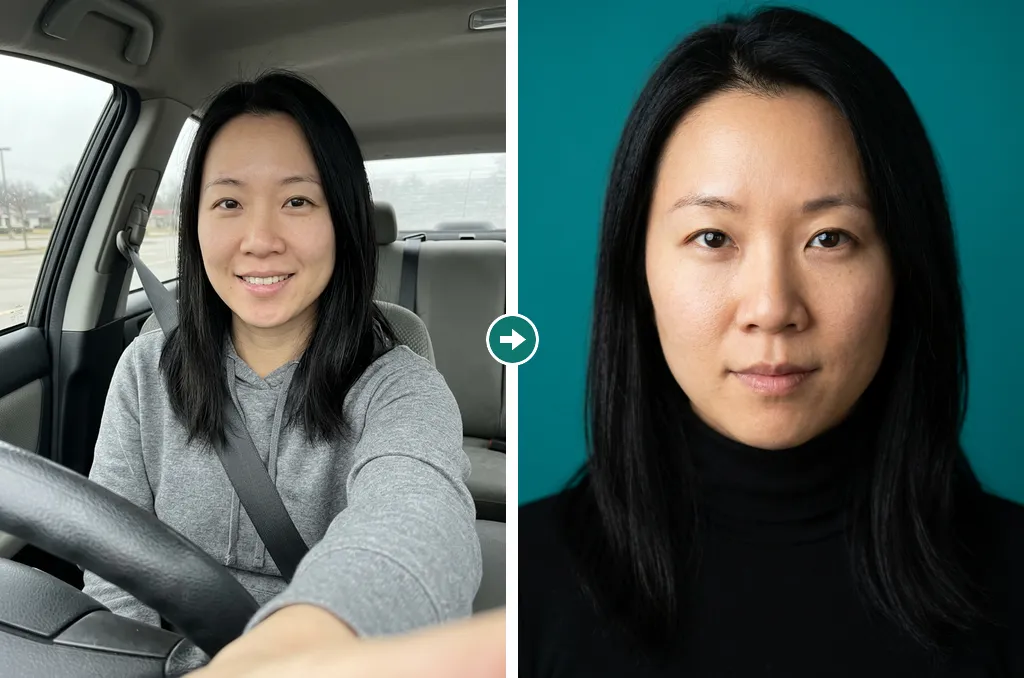
  • AI-generated example of a fictional person, a woman in her thirties: left, a casual selfie in a parked car, in a gray hoodie; right, a creative headshot in a black turtleneck against a teal wall, made from that selfie.

    Car selfie → creative headshot

    Headshot style: Creative: black turtleneck, bold saturated teal color wall, soft front light, confident look

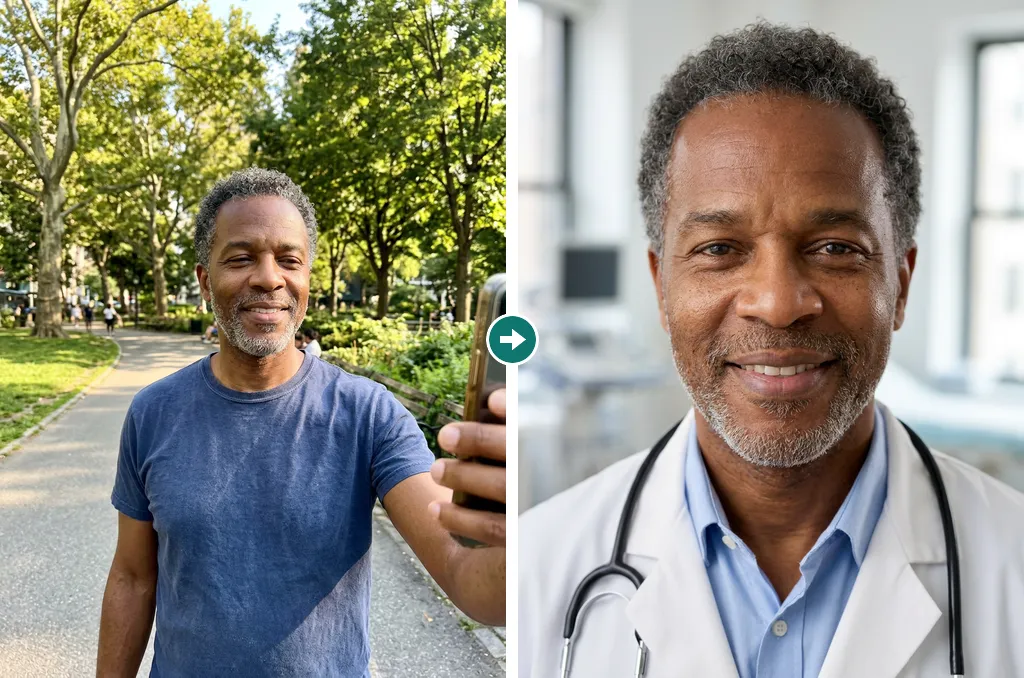
  • AI-generated example of a fictional person, a man in his fifties: left, a selfie in a sunny park, in a navy T-shirt; right, a doctor headshot in a white coat with a stethoscope, a clinic blurred behind, made from that selfie.

    Park selfie → doctor headshot

    Headshot style: Doctor: white coat over a light blue shirt, stethoscope around the neck, bright clinic softly blurred behind, reassuring smile

AI headshot or photographer?

Both have their place. AI is fast and cheap for profiles and refreshes; a photographer gives you a real photograph.

Headshot Generator AIPhoto studio session
Cost per headshotAbout $0.17–$0.56A session fee, often $100 or more
TimeAbout a minute per runBooking, travel and the session, then retouching
Changing the lookPick another style and run againUsually a new session
What you getA generated image based on your selfiesA real photograph of you
Best forProfiles, résumés, team pages, quick refreshesPress kits, casting and anywhere a real photo is required

AI headshot questions, answered

How does the AI headshot generator work?

You upload 1 to 3 selfies and choose a style. The generator sends your photos with a headshot brief to an image model (Nano Banana 2 for Fast, Nano Banana Pro for Studio), which draws a new head-and-shoulders portrait of you in that style.

Is it free?

New accounts get 40 credits, which is 2 free Fast headshots. After that, a headshot costs 20 credits with Fast or 45 with Studio, paid from a plan or a credit pack. There is no unlimited free tier.

Will the headshot look like me?

Usually, when the selfies are sharp and well lit; Studio keeps the likeness best. AI can still shift small details such as eye shape or hairline, so compare the variations and run again if something looks off.

Whose photos can I upload?

Only photos of yourself, or of an adult who has given you permission. Photos of anyone under 18 are not allowed, and neither are images meant to impersonate or embarrass someone. Accounts that break these rules are closed.

What happens to my photos?

Your selfies are stored at an unlisted link so the model can read them, and your headshots are saved to your private history. Only you see them. We keep them while your account is open and delete them when you ask us or close your account.

Can I use the headshots commercially?

Yes, for your own profiles, résumés, websites and company materials, as long as the headshot shows you or someone who agreed, and your use follows our terms of service.

What if a generation fails?

Credits for failed or cancelled generations return to your balance automatically, so you only pay for headshots you actually receive.

Can I use an AI headshot for a passport or ID?

No. Passports, visas and ID cards need an unedited photograph taken under official rules. Use AI headshots for profiles, résumés, websites and similar places.

Get your professional headshot today

Upload a selfie and use your 2 free Fast headshots to see the result.

Last updated October 6, 2026

Create your account